

Keyboard Guide
Find a simple guide on how to operate the keyboard and keyboard manual guides
Keyboard manual guides
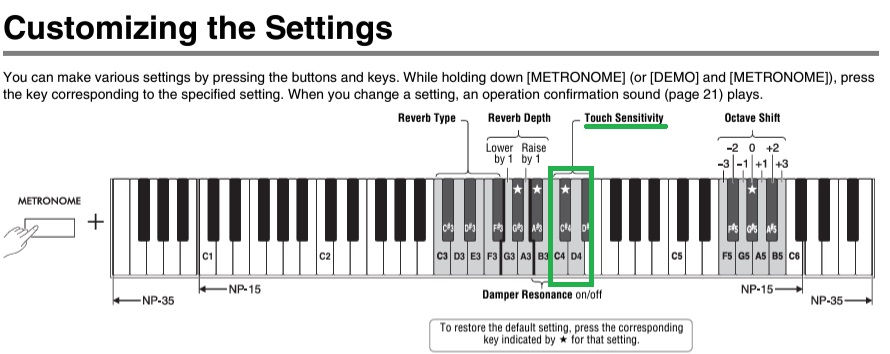
*Yamaha NP-15 Keyboard*
1. Touch Sensitivity - You can specify the degree of touch sensitivity (how the sound responds to your playing strength)
C4 - Soft: The volume level does not change much when you play the keyboard soft or hard.
C♯4 - Medium: This is the standard piano touch response.
D4 - Hard: The volume level changes very widely from pianissimo to fortissimo to facilitate dynamic and dramatic expression. You have to hit the keys hard to produce a loud sound.
D♯4 - Fixed: The volume level does not change at all regardless of whether you play the keyboard soft or hard.
*Yamaha NP-12 Keyboard*
1. Touch Sensitivity - You can specify the degree of touch sensitivity (how the sound responds to your playing strength)
A4 - Fixed: The volume level does not change regardless of whether you play the keyboard softly or strongly.
A#4 - Soft: The volume level does not change much when you play the keyboard softly or strongly.
B4 - Medium: This is the standard piano touch response (default setting).
C5 - Hard: You have to hit the keys strongly to produce a loud sound.

Simple guide on how to operate the keyboard:

PSR-E453 / E463
YAMAHA NP-12 / NP -15
1/A: YAMAHA NP-12 (61 key)
2/B : YAMAHA NP-12 (61 key)
3/C: YAMAHA NP-12 (61 key)
4/D: YAMAHA NP-12 (61 key)
5/E: YAMAHA NP-12 (61 key)
6/F: YAMAHA NP-12 (61 key)
7/G: PSR-E453 (61 key)
8/H: PSR-E463 (61 key) (Vendor)
9/I: PSR-E453 (61 key) (Vendor)
10/J: PSR-E463 (61 key) (Vendor)
11/K: PSR-E463 (61 key)
12/L: YAMAHA NP -15 (61 key)
13/M: PSR-E453 (61 key)
14/N: YAMAHA NP -15 (61 key)
15/O: YAMAHA NP -15 (61 key)